In this guide
Number ranges
System number ranges and any channel-specific overrides control later numbering. Changing them does not correct earlier documents retroactively. Do not reset counters as a test; first check the existing document set and the actual intended effect.
Payment terms
- Select the appropriate payment term in the template area you are authorised to use.
- Check its text and whether it applies to all documents, quotations only or invoices only.
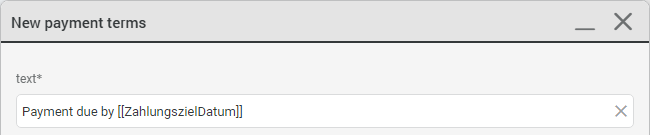
- Check placeholders and any custom closing line.
- Save, observe duplicate warnings and check the subsequent document preview.
A payment term does not record a payment. Early-payment discount text, due date and the actual matched payment remain separate.
Categories and media lists
Categories control business handling and access. A default letter template provides a draft, not an automatically sent letter. Media lists have their own team and versioning settings. Deactivating a definition does not automatically delete all existing files.
Status options
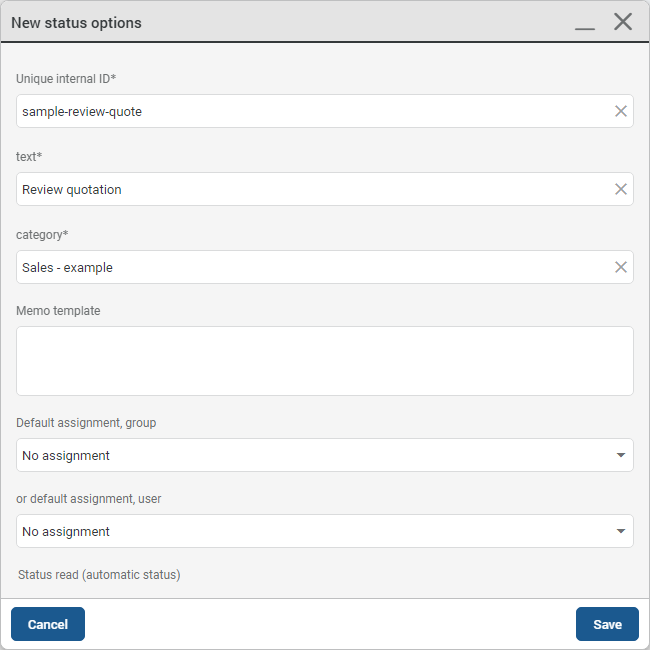
A status option with an identifier, text, category, memo and assignment defaults is a reusable definition. It is not an actual event. Check existing automation dependencies before changing it. Review what is actually prefilled the next time a status entry is created.